
Last updated on
Oct 31, 2026
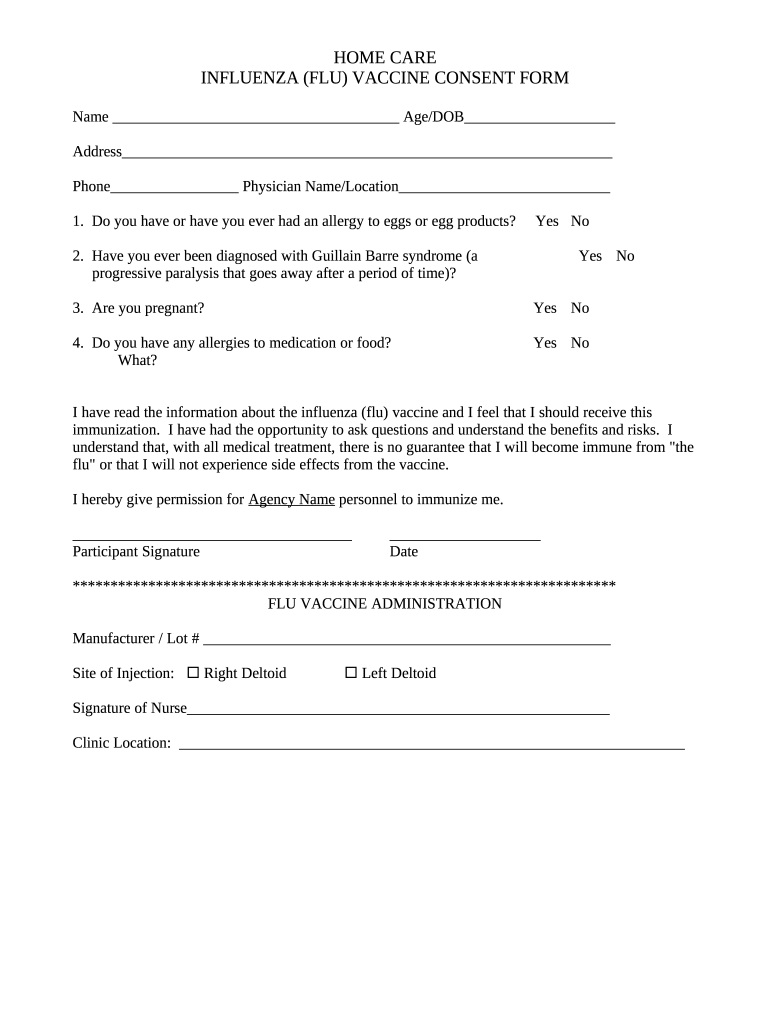
DC NAHC Home Care Influenza (Flu) Vaccine Consent Form 2018-2026 free printable template
pdfFiller is not affiliated with any government organization

Fill out
Complete the form online in a simple drag-and-drop editor.

eSign
Add your legally binding signature or send the form for signing.

Share
Share the form via a link, letting anyone fill it out from any device.

Export
Download, print, email, or move the form to your cloud storage.
Why pdfFiller is the best tool for your documents and forms


End-to-end document management
From editing and signing to collaboration and tracking, pdfFiller has everything you need to get your documents done quickly and efficiently.
Accessible from anywhere
pdfFiller is fully cloud-based. This means you can edit, sign, and share documents from anywhere using your computer, smartphone, or tablet.
Secure and compliant
pdfFiller lets you securely manage documents following global laws like ESIGN, CCPA, and GDPR. It's also HIPAA and SOC 2 compliant.
What is DC NAHC Home Care Influenza (Flu) Vaccine Consent Form
The Influenza Vaccine Consent Form is a medical consent document used by participants to grant permission for flu vaccine administration.
pdfFiller scores top ratings on review platforms




Who needs DC NAHC Home Care Influenza (Flu) Vaccine Consent Form?
Explore how professionals across industries use pdfFiller.

DC NAHC Home Care Influenza (Flu) Vaccine Consent Form is needed by:
-
Individuals receiving the influenza vaccine
-
Healthcare providers administering vaccines
-
Medical facilities offering flu vaccinations
-
Parents or guardians of minors receiving the vaccine
-
Nurses and medical staff
-
Public health organizations
Comprehensive Guide to DC NAHC Home Care Influenza (Flu) Vaccine Consent Form
What is the Influenza Vaccine Consent Form?
The Influenza Vaccine Consent Form serves to obtain consent from individuals prior to administering the flu vaccine. It is critical in ensuring participants are informed, thus upholding safety and legality in the vaccination process. This form is essential for both healthcare providers and patients, as it confirms understanding of the procedure and its implications.
Using terms such as "influenza vaccine consent form" and "flu vaccine consent form" is common within healthcare settings to emphasize its purpose in fostering patient trust and clarity about the vaccination process.
Purpose and Benefits of the Influenza Vaccine Consent Form
The significance of the Influenza Vaccine Consent Form lies in its role in securing informed consent from participants. This form not only protects healthcare providers legally during vaccine administration but also serves to inform patients about the vaccination process, including potential side effects.
-
Ensures informed consent, fostering transparency.
-
Legally safeguards healthcare providers when administering vaccines.
-
Enhances patients' understanding of the vaccine process.
Overall, using a well-structured vaccine consent form can significantly improve the vaccination experience for both providers and patients.
Key Features of the Influenza Vaccine Consent Form
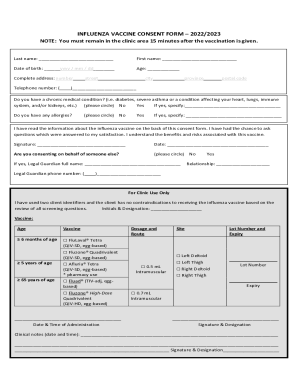
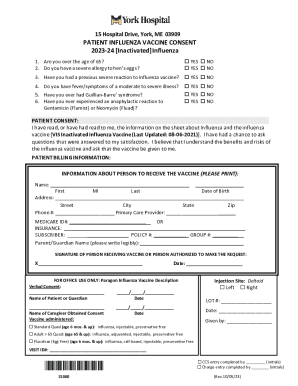
The Influenza Vaccine Consent Form includes several essential components crucial for completing the vaccination procedure. Key features of the form involve various fillable fields, including 'Name', 'Age/DOB', and 'Address'.
-
Sections for medical history focusing on allergies and pregnancy.
-
Signature lines are mandatory for both the participant and the administering nurse.
-
Checkbox options for medical conditions and personal disclosures.
These elements ensure all necessary information is gathered efficiently and accurately.
Who Should Use the Influenza Vaccine Consent Form?
The Influenza Vaccine Consent Form is designed for use by a variety of individuals and organizations. Primarily, it is intended for those receiving the flu vaccine, which includes both adults and children.
-
Adults and children receiving the flu vaccine.
-
Healthcare professionals administering the vaccine.
-
Clinics or organizations offering influenza vaccinations.
This form aids in organizing the documentation and ensuring that the vaccination process is compliant with health regulations.
How to Fill Out the Influenza Vaccine Consent Form Online (Step-by-Step)
Completing the Influenza Vaccine Consent Form online can be achieved in a few simple steps. Follow this guide to access and accurately fill out the form using pdfFiller.
-
Access the Influenza Vaccine Consent Form on pdfFiller.
-
Enter personal information in the designated fields, such as 'Name' and 'Date of Birth'.
-
Provide necessary medical history details, including allergies.
-
Review all information for accuracy before submission.
Ensure all required fields are completed to avoid delays in the vaccination process.
Common Errors and How to Avoid Them
When filling out the Influenza Vaccine Consent Form, certain errors may arise that can complicate the process. Identifying these common mistakes can help in submitting an accurate form.
-
Incomplete personal information or missing signatures.
-
Incorrect medical history disclosures, such as allergies.
To avoid these issues, verify your details against a review checklist before final submission. This diligence ensures completeness and prevents potential delays.
Security and Compliance for the Influenza Vaccine Consent Form
When it comes to the safety of sensitive information, the Influenza Vaccine Consent Form adheres to stringent data protection measures. These measures include encryption and compliance with regulations such as HIPAA and GDPR.
-
Utilizing trusted platforms like pdfFiller enhances data security.
-
Details entered are kept secure throughout the form-filling process.
This commitment to security instills confidence in users when completing their forms online.
Submission Methods for the Influenza Vaccine Consent Form
After completing the Influenza Vaccine Consent Form, it is essential to know how to submit it properly. There are several methods available for submission, ensuring convenience for users.
-
Submit the form via email to the designated clinic.
-
Deliver it in-person during your vaccination appointment.
-
Utilize any online submission options through your healthcare provider's platform.
Keep in mind any deadlines related to vaccine administration to ensure timely processing of your consent form.
Engaging with pdfFiller for Your Influenza Vaccine Consent Form Needs
Using pdfFiller simplifies the completion of your Influenza Vaccine Consent Form. This platform offers a range of benefits for editing and filling out documents securely.
-
Edit text, add images, and create fillable forms with ease.
-
Sign documents electronically, ensuring convenience.
-
Utilize robust security features for sensitive information protection.
These capabilities ensure a user-friendly and efficient experience when managing your Influenza Vaccine Consent Form.
How to fill out the DC NAHC Home Care Influenza (Flu) Vaccine Consent Form
-
1.To access the Influenza Vaccine Consent Form on pdfFiller, navigate to the pdfFiller website and search for the form name in the search bar.
-
2.Once located, click on the form title to open it in the pdfFiller editor interface.
-
3.Before filling out the form, gather necessary personal information, such as your name, age or date of birth, address, and any relevant medical history concerning allergies or pregnancy.
-
4.Begin filling out the form by entering your information into the designated fields, ensuring accuracy in spelling and details.
-
5.Use the checkboxes to answer questions regarding allergies and other relevant health information.
-
6.Sign the form by using the designated signature field for participants and ensure the administering nurse also provides their signature.
-
7.After completing all fields, review the form thoroughly for any errors or missing information.
-
8.Finalize your form by clicking the 'Save' option to store your completed document or use the 'Download' button to save it directly to your device.
-
9.If applicable, submit your form according to your healthcare provider’s instructions, either through email or in print.

Who is eligible to fill out the Influenza Vaccine Consent Form?
Any individual seeking to receive the influenza vaccine, including adults and minors (with parental consent), is eligible to fill out the form. Healthcare providers may also need to complete their sections.
Is there a deadline for submitting the Influenza Vaccine Consent Form?
There is generally no specific deadline for this form, but it's recommended to complete and submit it on the day of the vaccination or at least a few days prior to ensure all necessary approvals are in place.
How do I submit the Influenza Vaccine Consent Form after completing it?
After completing the form, you can submit it based on your healthcare provider's guidelines. This often includes emailing the completed form or presenting a printed copy during your vaccination appointment.
What supporting documents are needed with the Influenza Vaccine Consent Form?
Typically, no additional supporting documents are required for the consent form itself. However, having your identification and any relevant medical history on hand is advisable.
What are some common mistakes to avoid when filling out the form?
Common mistakes include leaving fields blank, misspelling your name or address, and forgetting to obtain the necessary signatures. Double-check all information before submission to avoid delays.
How long does it take to process the Influenza Vaccine Consent Form?
Processing times can vary, but the form is usually reviewed immediately by the administering staff at the time of your vaccination, ensuring eligibility before the vaccine is administered.
Can I use the Influenza Vaccine Consent Form for other vaccines?
No, the Influenza Vaccine Consent Form is specifically tailored for the flu vaccine. For other vaccines, you will require the respective consent forms provided by healthcare professionals.
Related Forms

Related Catalogs
Get the latest insights from our blog


If you believe that this page should be taken down, please follow our DMCA take down process
here
.
This form may include fields for payment information. Data entered in these fields is not covered by PCI DSS compliance.